

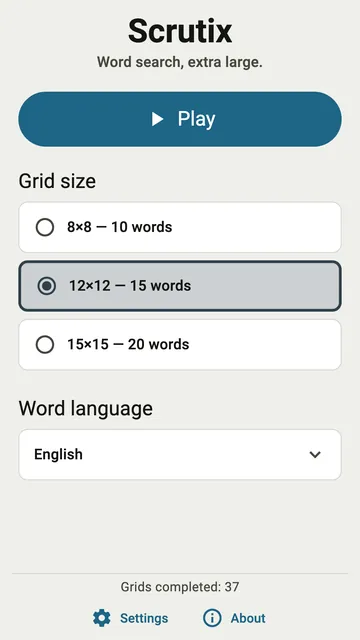
Scrutix is a word search for people who find small letters hard to read. Everything on the screen, the grid included, follows one setting: the text size.
Text size, inside the app
Tap Text size at the bottom of the home screen. Four sizes are offered: Normal, Large, Larger and Largest, up to twice the normal size. Each choice is written at its own size, so you see the result before you choose.
You do not need to find the font setting of your phone. If your phone already uses large text, Scrutix adds to it.
The grid follows the text
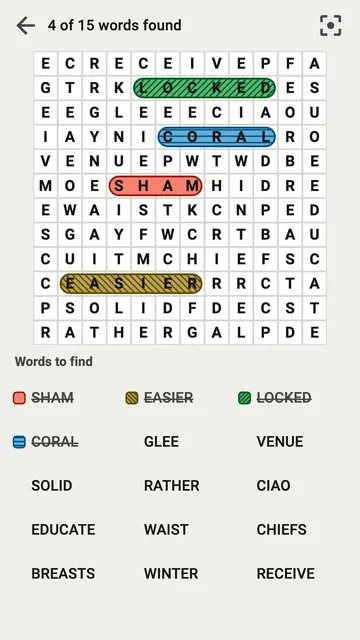
In many games, only the menus grow when you make the text bigger. In Scrutix, the letters of the grid grow too. The words to find are listed under the grid, in large capitals.
A smaller grid, never smaller squares
A phone screen has room for a limited number of large squares. When the letters get bigger, Scrutix serves a smaller grid rather than smaller squares. On a small phone at the largest size, a 12×12 grid becomes an 8×8 grid with fewer words.
Your choice of grid size is kept. When the screen cannot show it at this text size, a note under the sizes names the grid you will get.
Strong contrast, colour and pattern
The letters are dark on light squares, or light on dark squares in the dark theme. Each word you find gets a colour and a pattern: stripes, dots or bands. Two words next to each other stay easy to tell apart, even if you do not see colours well.